Email marketing for PrestaShop
Targeted email marketing for your PrestaShop
Create targeted newsletters using PrestaShop customer, purchase and product data. Import customers and orders separately, then build audiences and add products in mailfino.
- Import customers and purchase data separately
- Select buyers by product, order count or revenue
- Cloud, self-hosted or Enterprise

Newsletters in the shop or a dedicated workspace
Turn PrestaShop data into newsletter campaigns
The native ps_emailsubscription module collects newsletter signups and supports confirmation and verification emails. PrestaShop Automation with Klaviyo offers broader cloud automation. mailfino brings planned newsletters, purchase-based audiences and product cards together, with a choice of deployment models.
NATIVE PRESTASHOP
Collect signups in the shop
The native newsletter module provides a signup form, confirmation and verification emails, and subscriber management.
CLOUD AUTOMATION
Automate customer journeys
PrestaShop Automation with Klaviyo connects the shop to an external cloud for automated, cross-channel workflows.
MAILFINO
Design professional campaigns
Plan newsletters, select audiences by purchase history, add product cards and review results in one workspace — self-hosted if you prefer.
Customers, purchases and products
Use PrestaShop data for more relevant newsletters
Use separate profiles to import customers and orders when needed. The integration does not continuously synchronize data or write changes back to the shop.
CUSTOMER IMPORT
Choose which contacts to import
Import PrestaShop customers into the mailfino list you choose.
PURCHASE DATA
Select buyers precisely
The order import stores purchase data in the background. Filters by product, category, number of orders, revenue and last purchase date are possible.
PRODUCT CARDS
Add shop products faster
Product name, image, description, price and link are added to an editable newsletter card from the stored product data.
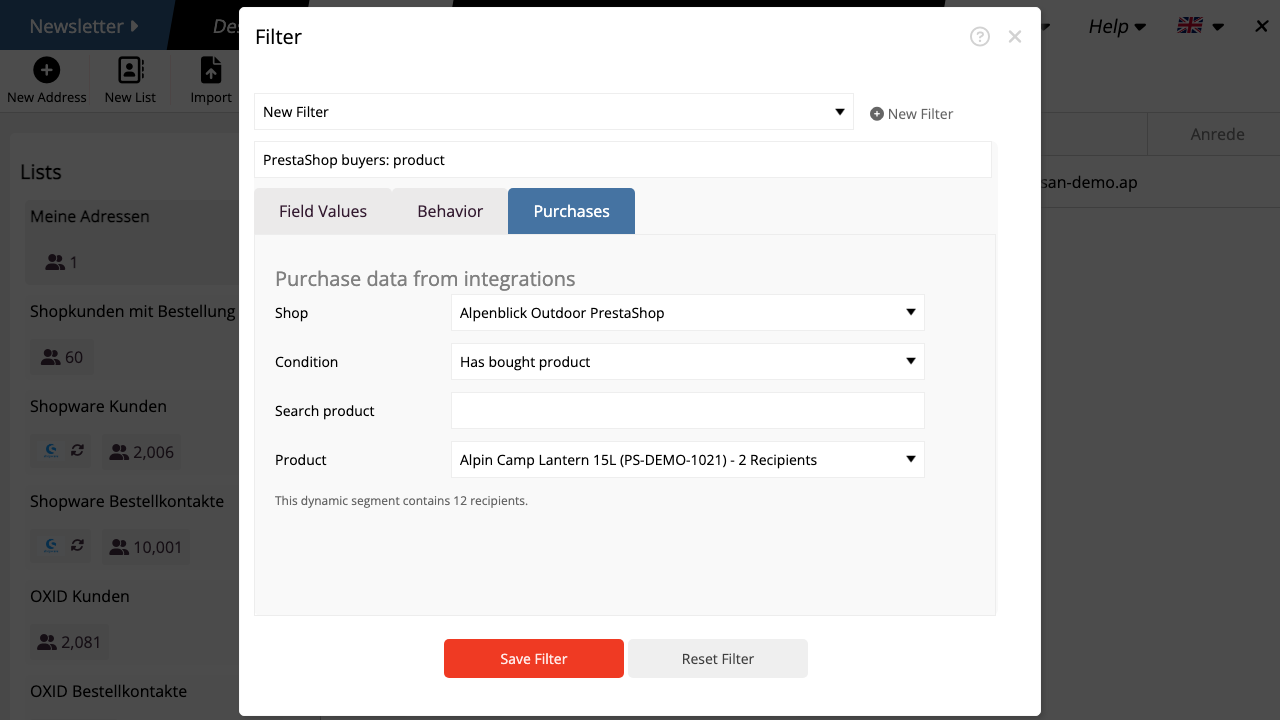
Audiences from purchase data
Reach buyers by product, category and customer value
Enable “Use purchase data for audiences” when importing orders. You can then filter existing mailfino contacts by purchases, categories, number of orders, revenue or last purchase date.
An order import does not create new newsletter contacts. The filter counts only existing contacts to whom purchase data can be matched.
Product content
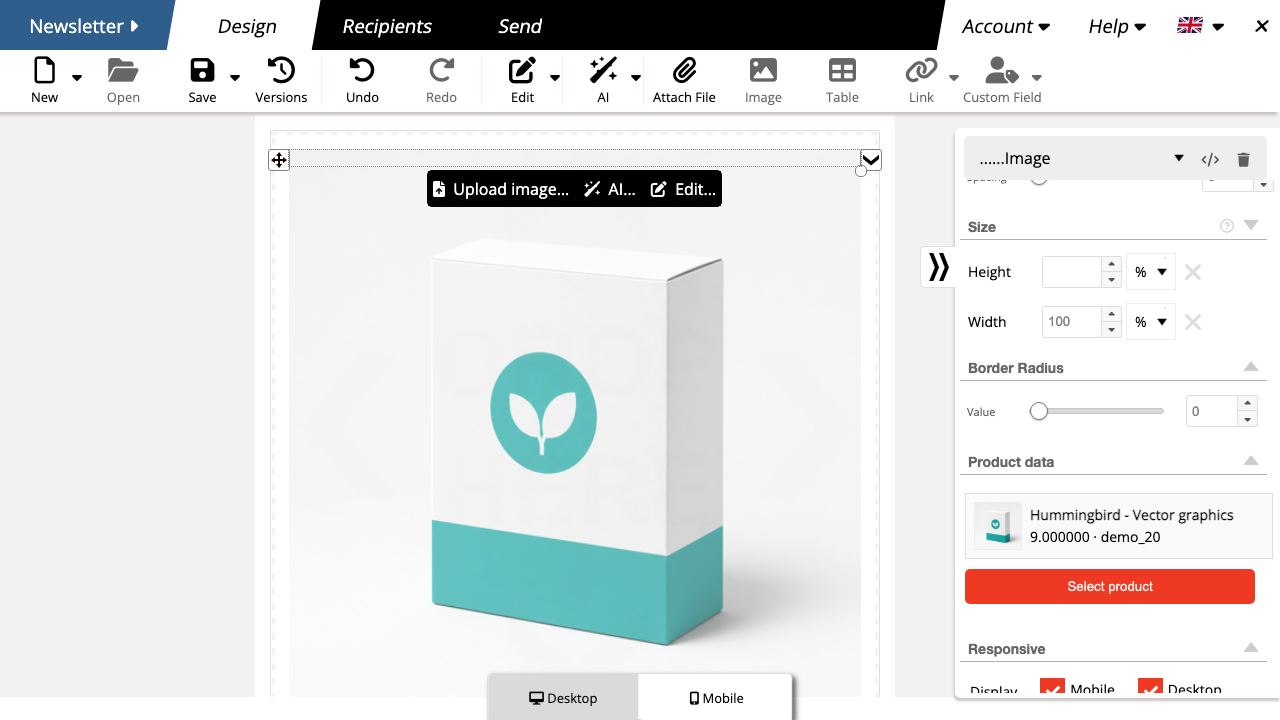
Add PrestaShop products to newsletters without copying and pasting
Search by product name, SKU or category in the editor. mailfino uses the stored product data as a starting point; text and layout remain editable before sending.
A saved newsletter card does not update automatically when shop data changes. Select the product again to import current data.
Purchase interest and consent
Keep audience selection and permission to send clearly separate
Shop data determines relevance
Orders help select suitable contacts and products. A customer account or purchase alone does not constitute newsletter consent.
mailfino checks permission to send
The integration does not import the PrestaShop newsletter preference as permission to send. Double opt-in, unsubscribes and suppression lists are managed separately in mailfino.
Read-only webservice
Connect PrestaShop without administrator or database access
Enable the PrestaShop webservice and enter the public shop URL and a dedicated webservice key in mailfino. The connection is checked before it is saved.
customersfor customer importsorders,order_details,products,categories,currenciesandimagesfor purchase segments and product cards- No write permissions and no data written back
- Repeat imports rather than real-time synchronization
Cloud, self-hosted or Enterprise
Run email marketing to suit your PrestaShop infrastructure
CLOUD
Get started directly
mailfino is operated for you and accesses the publicly accessible shop using the read-only webservice key.
SELF-HOSTING
Stay in control
Run your shop and newsletter platform on infrastructure you choose. Selfhosting Lite does not include integrations.
ENTERPRISE
Tailored integration
For larger organizations with individual requirements for operations, security, integration and support.
Ready for newsletters with PrestaShop?
FAQ
Questions about the PrestaShop newsletter integration
Is PrestaShop data synchronized?
No. Customers and orders are imported through separate import profiles that can be run again. There is no continuous real-time synchronization and no data is written back.
What should I check before repeating a customer import?
Confirm how existing contacts are matched before planning repeat imports. Do not assume that matching uses email addresses or PrestaShop customer IDs.
Does the order import create new newsletter contacts?
No. Orders are stored as background data. Purchase segments count only existing contacts to whom purchase data can be matched.
Does mailfino import newsletter consent from PrestaShop?
No. The documented integration does not treat the PrestaShop newsletter preference as permission to send. Permission is managed separately in mailfino.
Which purchase segments are possible?
Filter by purchased product, category, number of orders, revenue or last purchase date.
Do product cards stay up to date automatically?
No. Saved newsletter cards do not update automatically when shop data changes. Select the product again to import new data.
Which deployment models support the integration?
The integration is intended for mailfino Cloud, commercial Selfhosting and Enterprise. Selfhosting Lite does not include integrations.
