Email marketing for OTOBO
Reach OTOBO contacts with targeted newsletters
Import OTOBO contacts and organizations into mailfino. Use open or closed support cases to select contacts who have consented to newsletters. Ticket content stays in OTOBO.
- Import contacts and organizations
- Use support status to select audiences
- Limit queues through read permissions

OTOBO remains the place for service communications
Add planned email marketing to ticket notifications
OTOBO sends event-based ticket notifications and keeps customers and agents informed during the service process. mailfino adds separate newsletters with visual design, recipient lists, sending controls and reporting.
OTOBO remains the leading system for tickets. mailfino imports selected contacts and data-minimized status attributes so that marketers can take the current support situation into account when selecting audiences.
Which function fits which purpose?
OTOBO: service emails and notifications triggered by ticket events, queues, status or other support attributes.
mailfino: consent-based newsletters to curated audiences with a dedicated editor, sending and analysis.
Controlled data flow
Import contacts, companies and support status
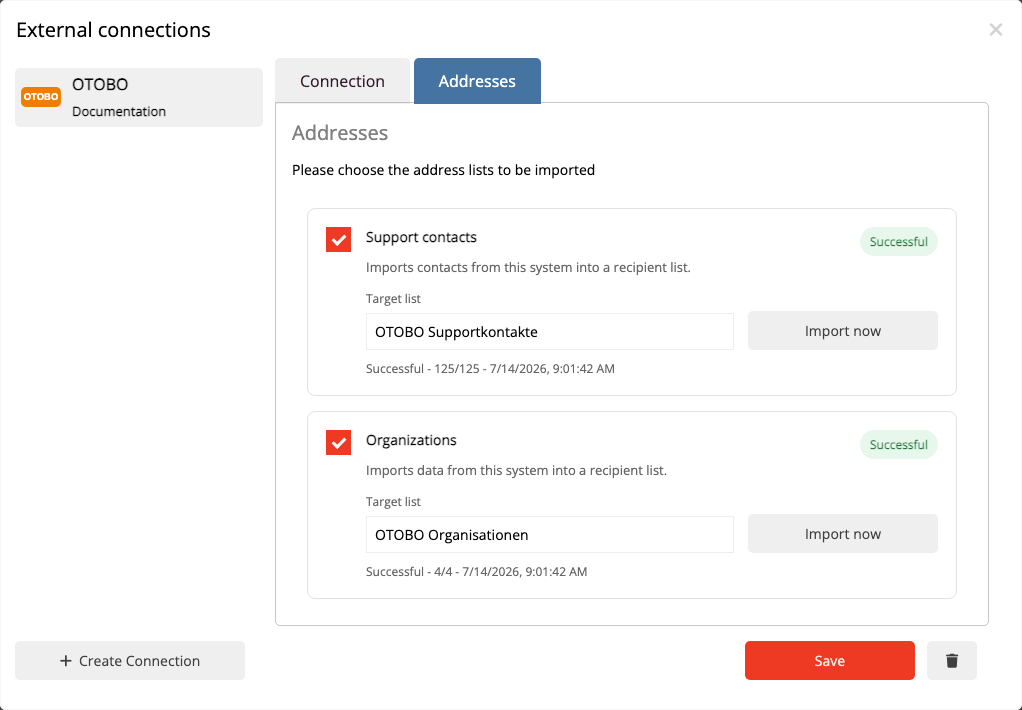
The integration is not real-time synchronization. You start separate imports for support contacts, organizations and ticket snapshots. Further runs update existing mappings rather than duplicating contacts.
OTOBO
Customer users, organizations and ticket attributes
→
Manual import
Run three separate profiles as needed
→
mailfino
Lists, support segments and newsletters
CONTACTS
Import customer users
Import customer users with an email address and, where available, first name, last name, telephone, mobile number and company.
ORGANIZATIONS
Retain company associations
Keep company links alongside your contacts, including the organization name, active status and creation and modification dates.
TICKETS
Put support status into context
Store ticket number, associations, title, status, open/closed indicator, priority, queue and relevant timestamps as snapshots.
Import rather than synchronization
Decide when OTOBO data is updated
Choose a destination list and start each import when needed. Repeat imports update existing contacts, company links and ticket snapshots.
When you delete the connection, mailfino removes the associated import profiles, mappings, snapshots and support segments. Contacts already imported are retained; OTOBO is not changed.
Audiences with support context
Take open and closed cases into account when selecting contacts
After the ticket import, mailfino creates segments for contacts with open and closed OTOBO tickets. Combine these with your usual list conditions to exclude ongoing support cases from a mailing or select contacts specifically after resolution.
Segment membership is updated with every ticket import. It contains only contacts already present in mailfino and does not create permission to send.

Limited read access
Make only the required OTOBO queues available
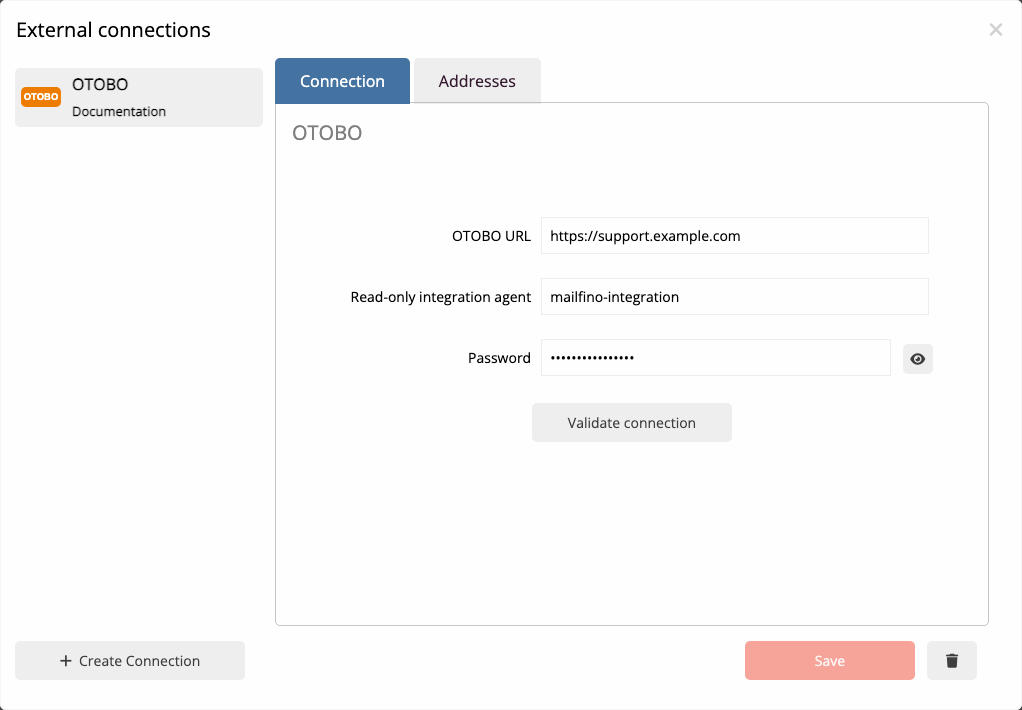
The package MailfinoOtoboReadOnly provides the read-only web service. A dedicated integration agent is given access only to the queues needed for the newsletter workflow.
The agent group, queue permissions and credentials are restricted transparently in OTOBO. The complete setup is described in the current manual.
Cloud, self-hosted or Enterprise
Choose deployment to suit your OTOBO environment
The OTOBO integration is available in mailfino Cloud, commercial Selfhosting and the Enterprise offering. If you run your own ticket system, you can also control the infrastructure for your email marketing.
CLOUD
Get started without operating it yourself
Use mailfino as a managed service and connect your publicly accessible OTOBO instance.
SELF-HOSTING
Run both systems yourself
Run your helpdesk and email marketing on your own infrastructure. Integrations are included in commercial Selfhosting.
ENTERPRISE
Meet individual requirements
Individual deployment, integration and support models are available for larger organizations.
Selfhosting Lite does not include integrations.
Clear backend and data boundaries
Ticket content stays in OTOBO
mailfino changes neither customers nor tickets. Articles, messages, history, internal notes, recipients and attachments are not imported.
- The integration agent receives read permissions only for selected queues.
- Customer users and organizations are read exclusively from OTOBO's standard database backends.
- LDAP and custom customer backends are not supported.
- A support contact does not create newsletter consent.
Ready for newsletters with OTOBO?
FAQ
Frequently asked questions about the OTOBO newsletter integration
What email communication does OTOBO already support?
OTOBO can send event-based ticket notifications to customers and agents using ticket filters, recipients, templates and variables. mailfino adds separate newsletter campaigns, audiences, sending and reporting.
Which data does mailfino import from OTOBO?
There are separate imports for support contacts, organizations and ticket snapshots. See the User guide for the specific contact fields and ticket attributes.
Is the connection real-time synchronization?
No. The three imports are deliberately started. Further runs update existing contacts and mappings without creating duplicates.
Are ticket messages, notes or attachments imported?
No. Ticket articles, message content, history, internal notes, recipients and attachments remain exclusively in OTOBO.
Does mailfino write data back to OTOBO?
No. The MailfinoOtoboReadOnly package provides a read-only web service.
Which permissions does the integration agent need?
The agent must have at least read-only membership in the group configured under MailfinoOtoboReadOnly::AgentGroup and read permissions for the required queues. The default group name is mailfino-integration.
Are LDAP or custom customer backends supported?
No. The integration reads customer users and organizations exclusively from OTOBO's standard database backends customer_user and customer_company.
Does importing an OTOBO contact create newsletter consent?
No. Consent, unsubscribe status and blocklists are handled in mailfino independently of the support contact.
Which deployment models support the OTOBO integration?
The integration is available in mailfino Cloud, commercial Selfhosting and the Enterprise offering. Selfhosting Lite does not include integrations.
