Email marketing for FreeScout
Use FreeScout contacts for targeted newsletters
Import support contacts and select recipients who have given consent according to whether a conversation is open or closed. mailfino handles design, sending and analysis without copying conversation content.
- Choose which contacts to import
- Use support status to select audiences
- Message content stays in FreeScout

FreeScout remains the place for support
Add professional email marketing to your service communications
FreeScout handles shared mailboxes, customer inquiries and replies. Its optional Workflow module can send predefined emails from a conversation. For planned newsletter campaigns, mailfino adds a dedicated editor, recipient lists, sending and reporting.
Support and marketing remain separate processes: FreeScout handles the conversations, while mailfino uses only the contact data and status attributes needed for selection and newsletter sending.
Which function fits which purpose?
FreeScout: personal replies, automatic responses and status communications related to a conversation.
mailfino: consent-based newsletters to selected audiences, with design, sending controls and analysis.
Controlled data flow
Import contacts and update support status as needed
The integration is not real-time synchronization. You start separate imports for support contacts and conversation snapshots. Further runs update existing mappings without creating the same contacts again.
FreeScout
Customers and conversation attributes
→
Manual import
Run contacts and snapshots separately
→
mailfino
Lists, segments and newsletters
CONTACTS
Import customer data
Import customers with a usable email address. First name, last name, telephone number and company are imported where available in FreeScout.
STATUS
Use support status to select recipients
Select recipients using snapshots of conversation details: number, subject, mailbox, company association, status and timestamps. Message content stays in FreeScout.
AUDIENCES
Separate open cases for targeted selection
mailfino creates segments for contacts with open and closed conversations. These can be combined with normal list conditions.
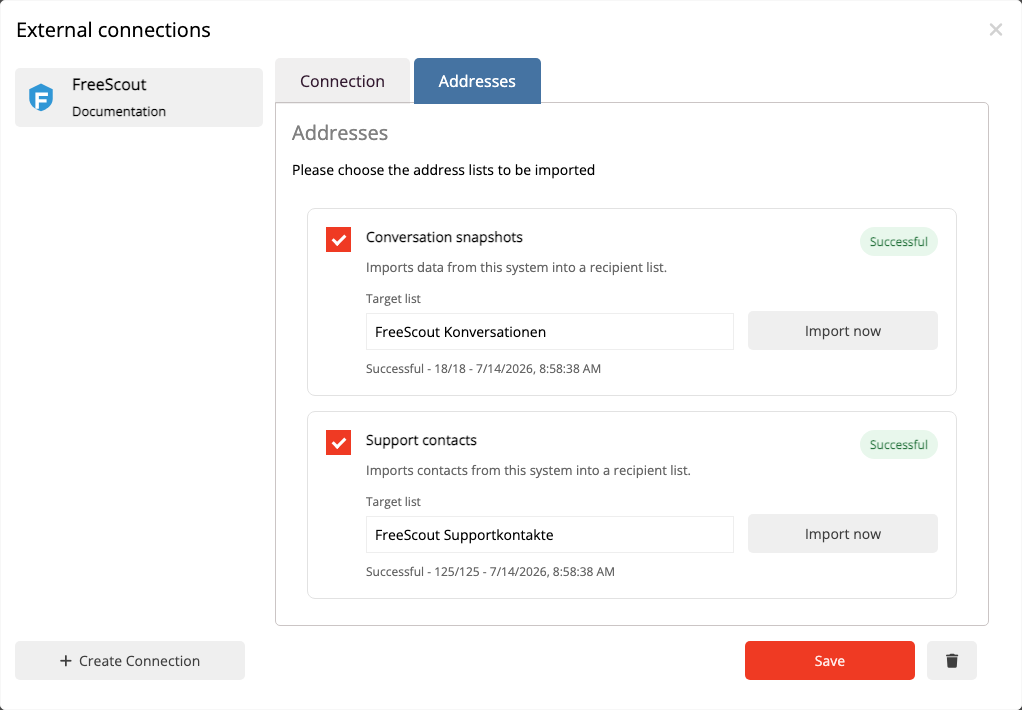
Repeatable import
Refresh contacts and support status when needed
Choose a destination list for each import. Run it again whenever you need to update existing contacts and their support information.
When you delete the connection, mailfino removes import profiles, mappings, snapshots and automatically generated support segments. Contacts already imported are retained; FreeScout itself is not changed.
Audiences with support context
Contact customers according to their current support situation
Combine the automatically generated segments for open or closed conversations with your other list conditions. You can exclude contacts with an ongoing inquiry from general mailings or select them specifically once the inquiry is resolved.
The segments contain only contacts already present in mailfino. Support status replaces neither consent nor permission to send.

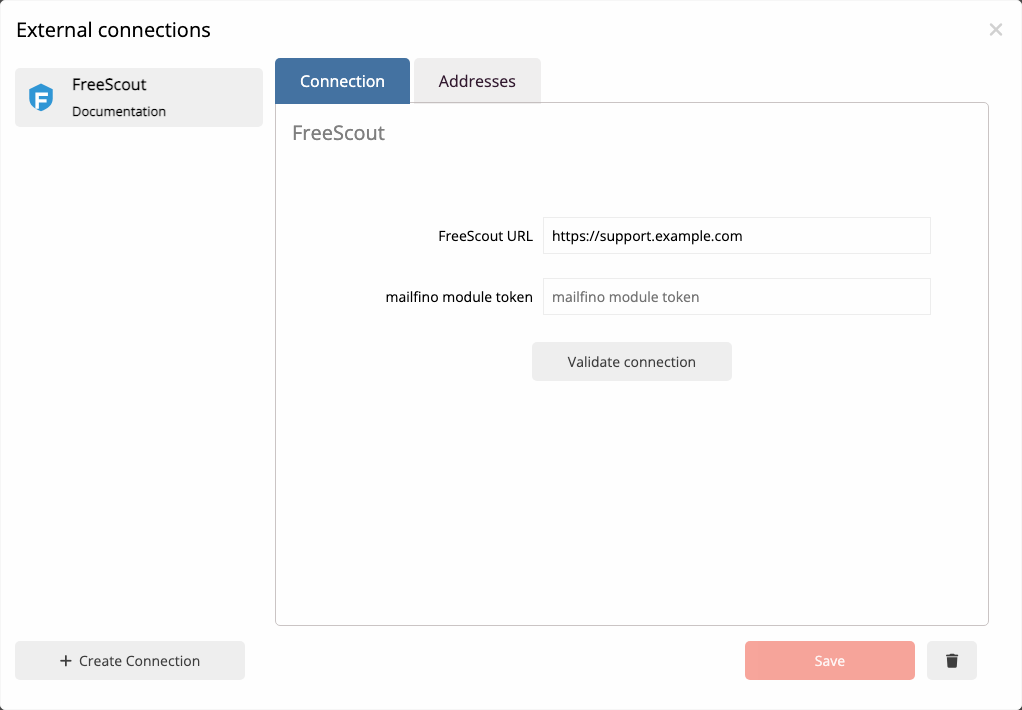
Connection with minimal data
Connect FreeScout through a dedicated read-only module
The mailfino-provided module MailfinoReadOnly exposes only the required read endpoints. The commercial FreeScout “API & Webhooks” module is not required.
Connect the publicly accessible HTTPS instance using a dedicated connector token. Technical setup and the correct FreeScout environment variable are described in the current manual.
Cloud, self-hosted or Enterprise
Run email marketing to suit your FreeScout environment
The FreeScout integration is available in mailfino Cloud, commercial Selfhosting and the Enterprise offering. Self-hosted helpdesks in particular can be extended with a newsletter workflow offering comparable operational control.
CLOUD
Get started without operating it yourself
Use mailfino as a managed service and connect your publicly accessible FreeScout instance.
SELF-HOSTING
Extend your control
Run email marketing on your own infrastructure too. Integrations are included in commercial Selfhosting.
ENTERPRISE
Meet individual requirements
Individual deployment, integration and support models are available for larger organizations.
Selfhosting Lite does not include integrations.
Clear data boundaries
Conversation content stays in the helpdesk
mailfino does not change customers or conversations in FreeScout. Message text, previews, internal notes and attachments are not imported.
- The connection is exclusively read-only.
- A support contact is not automatically subscribed to newsletters.
- Consent, unsubscribe status and blocklists continue to be checked in mailfino.
- The import is deliberately started and is not real-time synchronization.
Ready for newsletters with FreeScout?
FAQ
Frequently asked questions about the FreeScout newsletter integration
What email communication does FreeScout already support?
FreeScout is designed for shared mailboxes and support conversations. The optional Workflow module can send predefined emails based on a conversation. mailfino adds separate newsletter campaigns, audiences, sending and reporting.
Which data does mailfino import from FreeScout?
The contact import brings in customers with a usable email address and, where available, first name, last name, telephone number and company. Conversation snapshots store the number, customer and company association, subject, status, open/closed classification, mailbox and relevant timestamps.
Is the connection real-time synchronization?
No. You deliberately start contact and snapshot imports. Further runs update existing contacts and mappings without creating duplicates.
Are messages, notes or attachments imported?
No. Message text, previews, internal notes and attachments remain exclusively in FreeScout.
Does mailfino write data back to FreeScout?
No. The MailfinoReadOnly module provides read-only endpoints.
Does the integration require the FreeScout “API & Webhooks” module?
No. The integration uses the MailfinoReadOnly module provided by mailfino.
How is the connector token configured?
A long random token is stored in the FreeScout.env file as MAILFINO_READONLY_TOKEN . The FreeScout instance must be publicly accessible over HTTPS. The complete setup is described in the User guide.
Does importing a support contact create newsletter consent?
No. Consent, unsubscribe status and blocklists are handled in mailfino independently of the support contact.
Which deployment models support the FreeScout integration?
The integration is available in mailfino Cloud, commercial Selfhosting and the Enterprise offering. Selfhosting Lite does not include integrations.
