Email marketing for Znuny
Reach Znuny contacts based on their support status
Import active customers and organizations into mailfino and distinguish between contacts with open or completed support cases — through restricted read-only access.
- Repeatable imports without duplicates
- Open and closed cases as audiences
- Read-only package with restricted group permissions
TICKET COMMUNICATIONS AND NEWSLETTERS
Add a dedicated newsletter workspace to Znuny
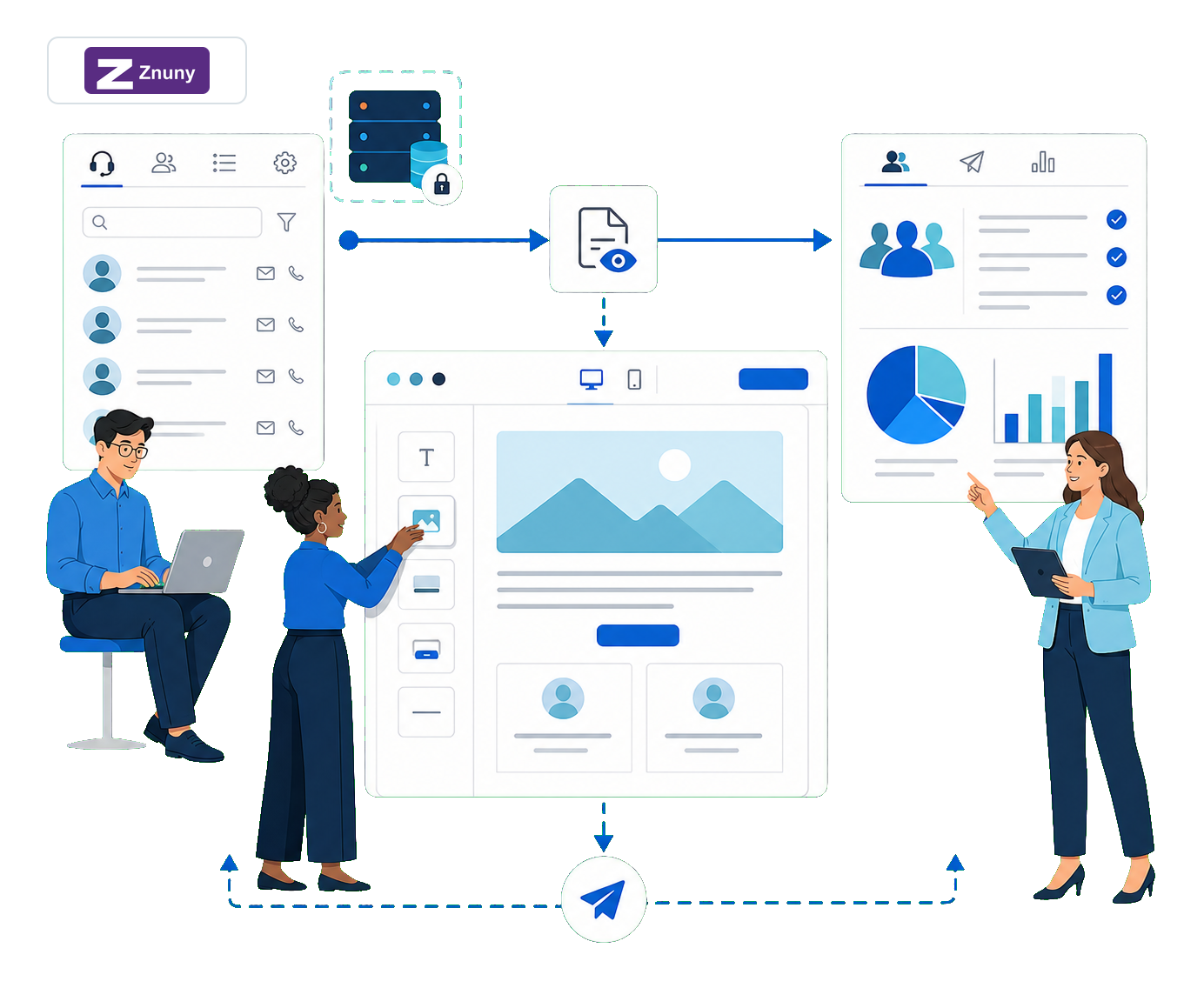
Znuny organizes tickets, email communications and event-based notifications. mailfino does not replace these service processes. It adds contact management, forms and consent, newsletter design, sending and reporting.
Import when needed: An import is started in mailfino and can be run again later. Existing entries are updated rather than duplicated. There is neither ongoing real-time synchronization nor write-back to Znuny.
01 · Znuny
Maintain support data
Manage customers, organizations and tickets in the service desk
→
02 · Import
Transfer data
Update approved contact and ticket attributes as needed
→
03 · mailfino
Send newsletters
Select audiences you have permission to contact, design, send and analyze
Znuny documents ticket emails and notifications for customers, agents and external recipients. The mailfino integration remains separate and uses only the read-only data scope described in the current manual .
CONTACTS AND TICKET SNAPSHOTS
Import exactly the Znuny data your newsletter workflow needs
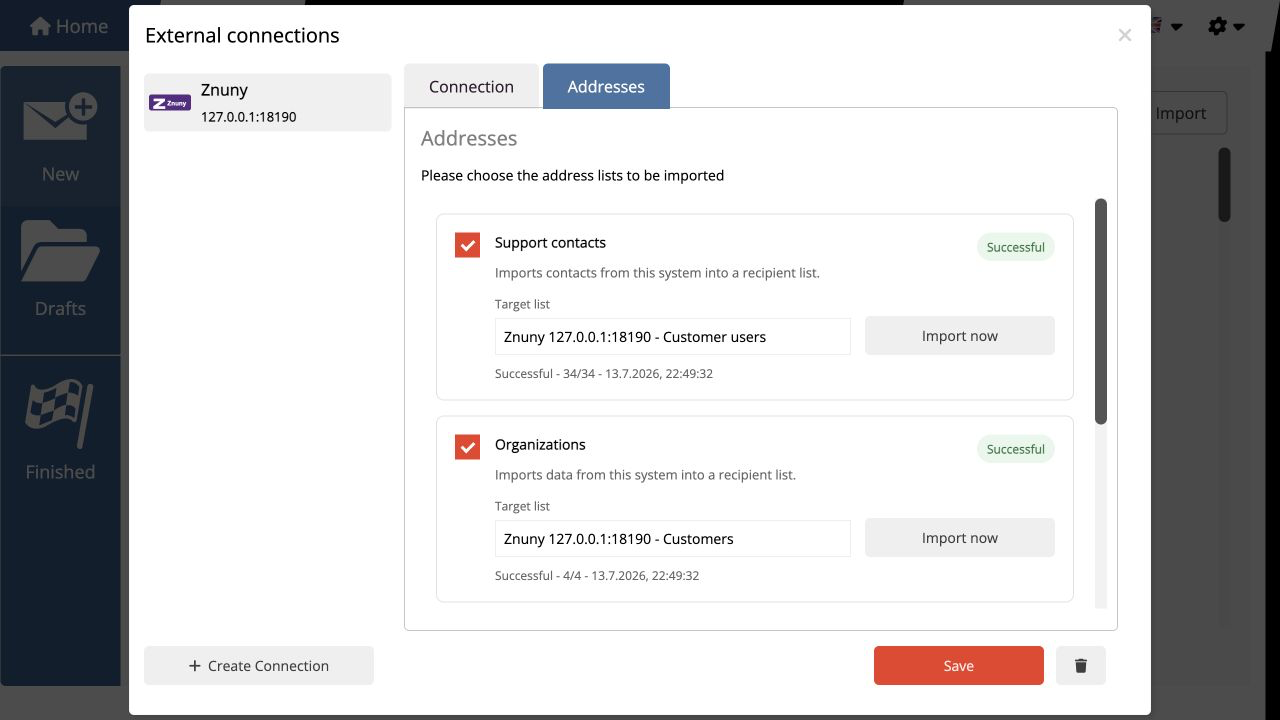
In the connection manager, you enable support contacts, organizations and ticket snapshots separately. Active customers with an email address are imported into a list; organizations add company associations.
- Select individual import profiles and give destination lists clear names
- Run the import again later to update existing entries
- Use ticket number, title, status, priority, queue and timestamps as context
AUDIENCES FROM SUPPORT STATUS
Distinguish between contacts with open and completed cases
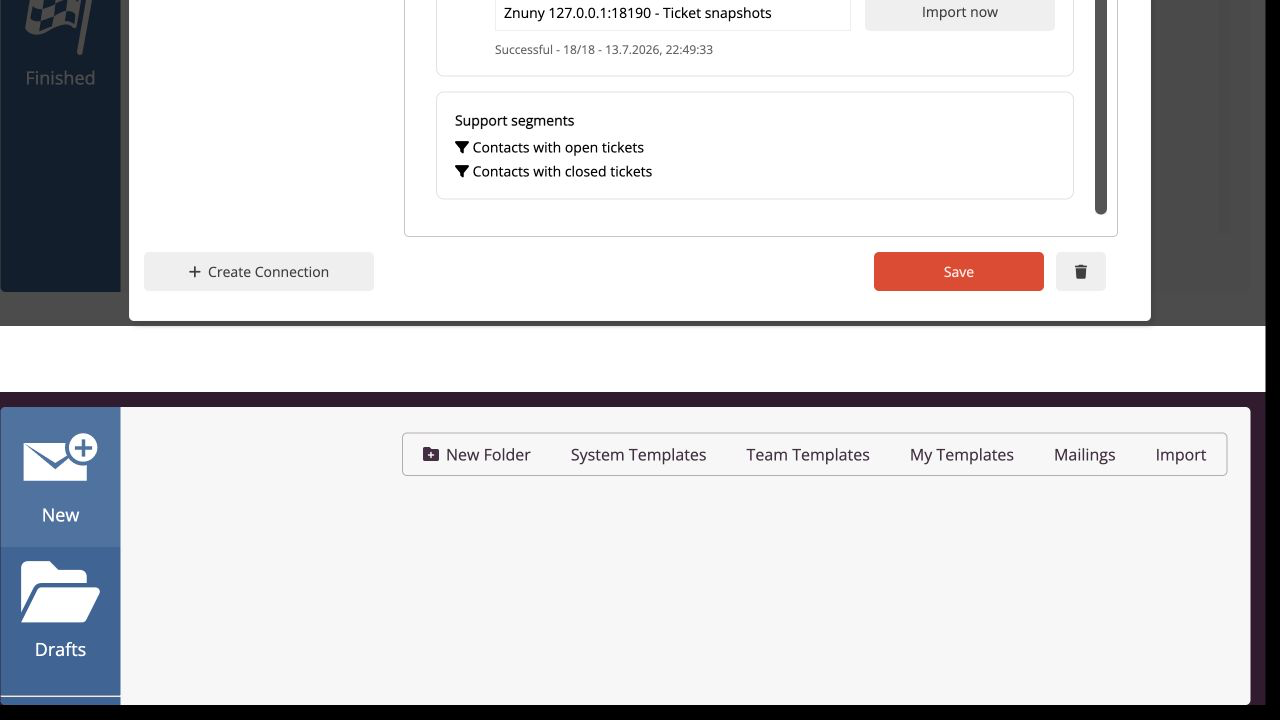
After the ticket import, two audiences are available. Matching is based on email address and can be combined with other mailfino lists and filters.
OPEN TICKETS
Take current support cases into account
Treat consenting contacts with an unresolved inquiry separately when selecting audiences.
CLOSED TICKETS
Identify completed cases
Select existing subscribers according to whether a documented support case has already ended.
EMAIL MATCHING
Count contacts only once
A person only appears as an existing mailfino contact and is counted only once, even if they have multiple tickets.
READ-ONLY PACKAGE AND GROUP PERMISSIONS
Restrict access to the required support areas directly in Znuny
The package MailfinoZnunyReadOnly sets up the required web service. A dedicated integration user receives only the permission ro in the groups whose tickets should be taken into account.
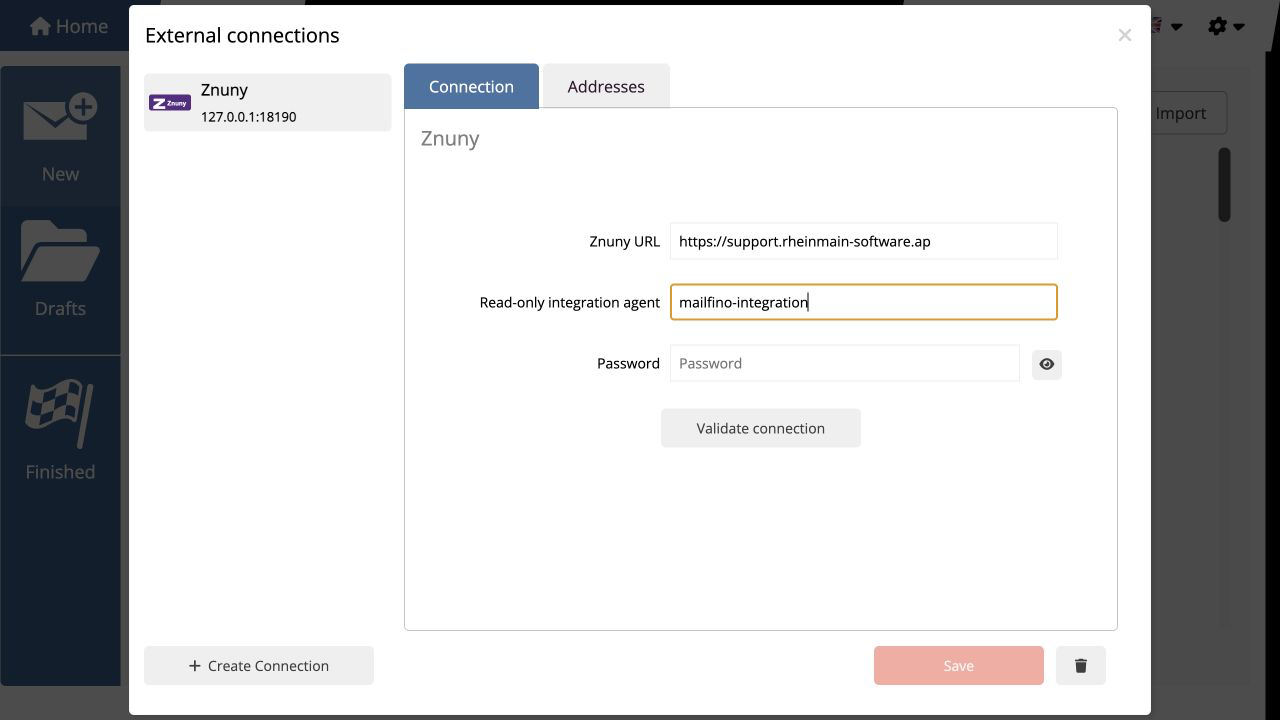
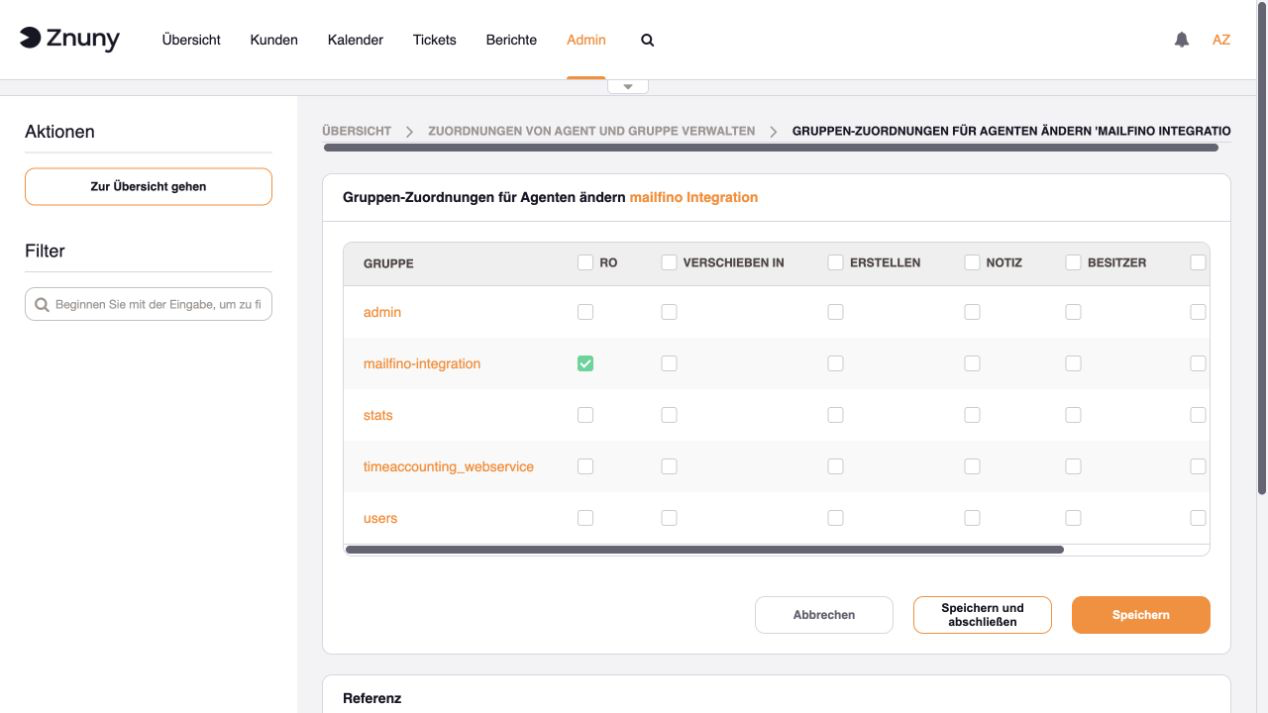
The normal Znuny address, dedicated integration user and their password are stored in mailfino for the connection. For a system accessible over the internet, the address must begin with HTTPS. The complete setup is described in the technical manual.
MAILFINO IN THE NEWSLETTER WORKFLOW
Add design, sending and reporting to the service desk
Keep tickets and notifications in Znuny. Plan, design and send your newsletters in mailfino.
SELECT
Build audiences you have permission to contact
Combine support status, lists and other filters without automatically deriving permission to send from them.
DESIGN
Create newsletters yourself
Create responsive newsletters in the visual editor and check content and appearance before sending.
ANALYZE
Analyze sending separately
Assess deliveries, responses, unsubscribes and errors in mailfino's newsletter reporting.
DEPLOYMENT ON YOUR TERMS
Use the Znuny integration in Cloud, Selfhosting or Enterprise
The same newsletter workflow is available in the three professional deployment models. Selfhosting Lite does not include integrations.
CLOUD
Get started directly with mailfino
mailfino is operated for you; Znuny must be accessible over HTTPS for read access.
SELF-HOSTING
Control operation and data flows
Run mailfino on your infrastructure and connect your own installation directly to Znuny.
ENTERPRISE
Meet individual requirements
Individual deployment, integration and project models are available for larger organizations.
CLEAR SYSTEM BOUNDARIES
Keep ticket content and permission to send separate
The read-only web service provides only the documented attributes. Conversation history stays in Znuny; newsletter consent remains a separate process in mailfino.
- Messages, internal notes and attachments stay in Znuny.
- mailfino changes neither customers nor tickets in the service desk.
- Group permissions determine which tickets can be read.
- A support contact or ticket is not newsletter consent.
- Consent, unsubscribes and blocklists are applied when sending in mailfino.
Ready for newsletters with Znuny?
FAQ
Questions about the Znuny newsletter integration
Doesn’t Znuny already send customer emails?
Znuny supports operational ticket emails and event-based notifications. mailfino extends these service communications with a separate newsletter workflow featuring consent management, a visual editor, sending and reporting.
Which extension is required in Znuny?
The mailfino-provided package MailfinoZnunyReadOnly sets up the required read-only web service. After installation, it should appear as valid under Admin → Webservices.
Which user and permissions are required?
A dedicated active integration user is used. In the required groups, they receive only the permission ro. The Znuny address, username and password are stored in mailfino for the connection.
Which data does mailfino import?
Import active customers with an email address, their organizations and ticket snapshots containing number, title, status, priority, queue, and creation and modification dates.
Are Znuny and mailfino continuously synchronized?
No. The import is started in mailfino and can be run again later. Existing entries are updated rather than duplicated. No data is written back to Znuny.
How are support audiences created?
After the ticket import, audiences for contacts with open and closed tickets are available. Matching is based on email address; a contact with multiple tickets is counted only once.
Is a Znuny contact automatically subscribed to newsletters?
No. Support status and permission to send are separate. mailfino takes existing consent, unsubscribes and blocklists into account when sending.
What happens when the connection is deleted?
Imported organization and ticket information, as well as support audiences, are removed. Contacts already imported remain in the lists; Znuny itself is not changed.
Which deployment models support the Znuny integration?
The integration can be used with mailfino Cloud, commercial Selfhosting and Enterprise. Selfhosting Lite does not include integrations.
Where can I find the technical setup instructions?
The individual steps for the package, web service, integration user, connection, import and segments are described in the current mailfino manual.
