CHATWOOT NEWSLETTER INTEGRATION
Use Chatwoot contacts for professional newsletters
Import existing contacts into a defined mailfino list whenever needed. Conversations stay in Chatwoot; manage consent, design, sending and reporting in mailfino.
- Import email, first name, last name and phone number
- Chatwoot remains unchanged
- Cloud, self-hosted or Enterprise

Keep support and newsletters separate
Use Chatwoot for conversations and mailfino for regular newsletters
Chatwoot focuses on support, live chat and channel-specific outbound messages. mailfino adds a separate newsletter process with visual design, recipient lists, sending permissions, unsubscribes and reporting.
Chatwoot Campaigns
Direct communication in a support context
Ongoing campaigns address website visitors in live chat. One-off campaigns reach selected contact groups through supported communication channels. The native feature is well suited to operational messages and conversations.
mailfino
A reliable process for newsletters
Design regular email newsletters, manage sending permissions and unsubscribes separately from your helpdesk, and analyze delivery and responses in a system built for that purpose.
From support contact to newsletter audience
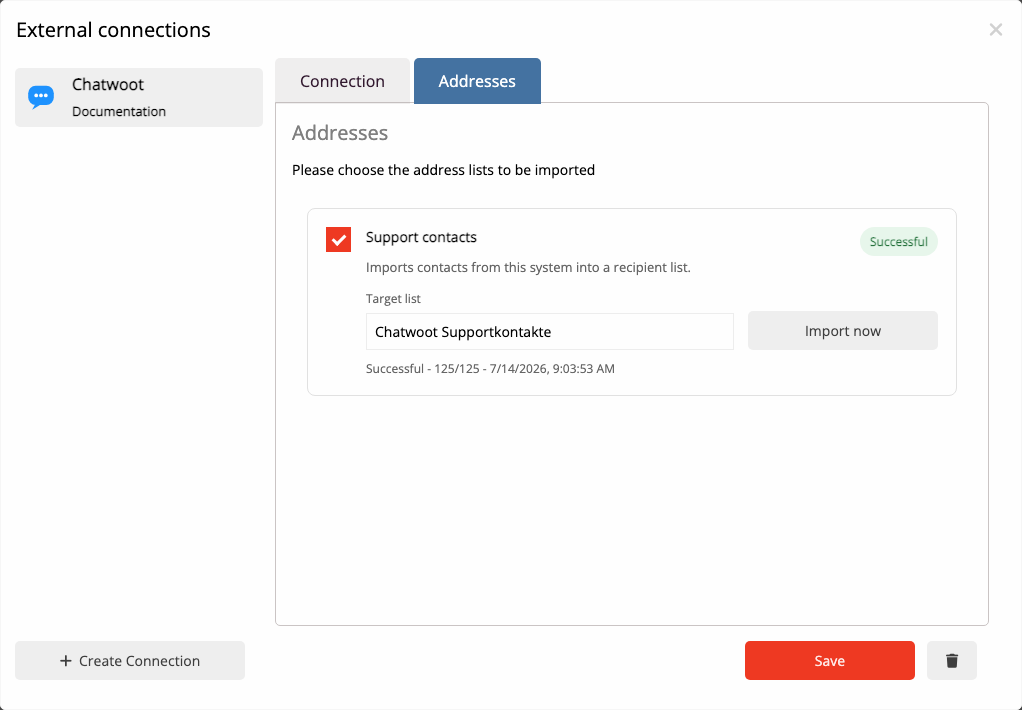
Import exactly the contact data your newsletter process needs
Choose a mailfino list and start the import when you need it. Data flows from Chatwoot to mailfino; Chatwoot stays unchanged.
Chatwoot
Email address, first name, last name and phone number
→
Import when needed
Start the import and update linked contacts
→
mailfino list
Check consent, select an audience and send your newsletter
From contact to newsletter
Keep support data focused and sending traceable
CONTACTS
Import four standard fields
mailfino imports email address, first name, last name and phone number where those values are available in Chatwoot.
DATA MINIMIZATION
Leave conversation content in your helpdesk
Conversations, messages, notes, attachments, labels, segments and custom attributes are not imported.
REPEAT IMPORTS
Update the contacts you have already imported
Run the import again to update contacts already linked to Chatwoot, without creating them again.
Setup without programming
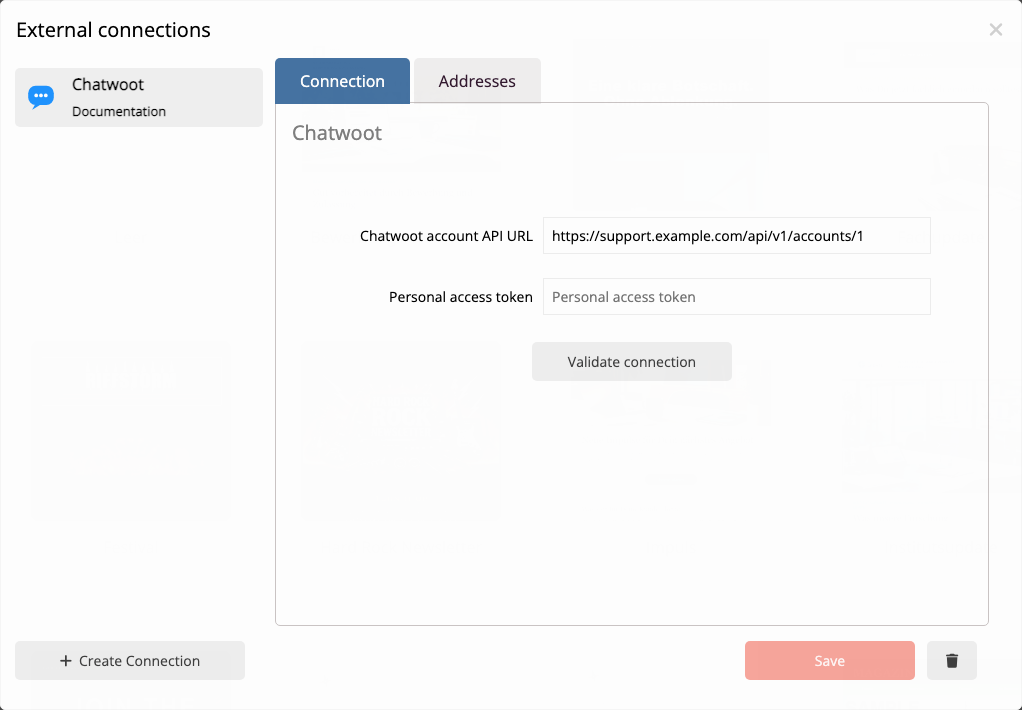
Check the connection before importing data
In the mailfino integration manager, enter the full Chatwoot account API address and the personal access token of a designated user. The connection is saved only after a successful connection check.
The individual technical steps are described in the current mailfino manual.
Newsletters beyond support emails
Design content that goes beyond a helpdesk message
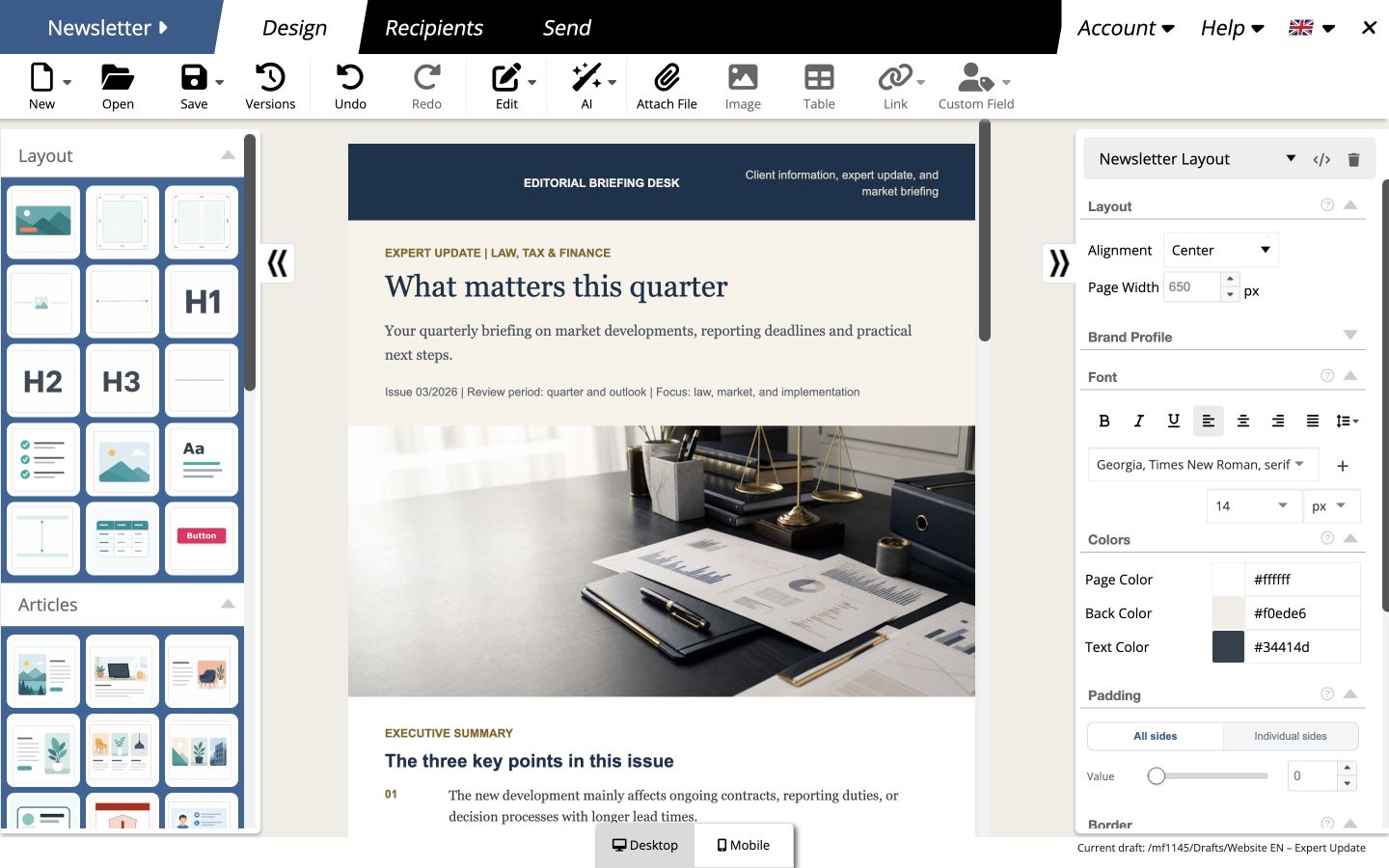
In mailfino, business teams create newsletters with drag and drop, reuse content, check desktop and mobile views and analyze the results after sending.
This does not automatically give a Chatwoot contact permission to receive newsletters. Sending depends on documented consent and mailfino's suppression and unsubscribe rules.
Cloud, self-hosted or Enterprise
Keep the same control over email marketing as you do over support
Chatwoot is available in the cloud and as a self-hosted system. mailfino gives you the same strategic choice for your newsletter process.
Cloud
Get started quickly without running the newsletter platform yourself. The Chatwoot endpoint must be reachable for the controlled import.
Self-hosting
Run mailfino on your own infrastructure and control your data flows and technical environment. Integrations are included in the commercial editions.
Enterprise
A separate Enterprise offering is available for individual requirements for deployment, security, integration and support.
Ready for newsletters with Chatwoot?
FAQ
Frequently asked questions about the Chatwoot newsletter integration
Why use mailfino when Chatwoot offers Campaigns?
Chatwoot Campaigns are suited to channel-specific outbound messages in a support and conversational context. mailfino adds a separate process for designed email newsletters, recipient lists, consent, unsubscribes and sending reports.
Which data does mailfino import from Chatwoot?
Email address, first name, last name and phone number are imported where available in Chatwoot. Only contacts with a usable email address can be used as newsletter contacts.
Are conversations, messages or labels imported?
No. Conversations, messages, notes, attachments, labels, segments and other Chatwoot custom attributes remain in the helpdesk.
Does mailfino write data back to Chatwoot?
No. The connection is read-only and does not change contacts in Chatwoot.
Does importing again create duplicates?
Run the import again to update contacts already linked to Chatwoot, without creating them again.
Is a Chatwoot contact automatically eligible to receive newsletters?
No. Importing contacts does not replace consent. Sending permissions, unsubscribes and suppression lists are taken into account in mailfino's newsletter process.
What are the connection requirements?
You need a Chatwoot instance publicly accessible over HTTPS, the account API address with a numeric account ID, and the personal access token of a designated Chatwoot user. The exact setup is described in the User guide.
Can mailfino run in the cloud or be self-hosted?
Yes. The integration is available for mailfino Cloud, commercial self-hosted editions and Enterprise. Selfhosting Lite does not include integrations.
